KeepChat · Teams app
Save a whole Teams chat in one file.
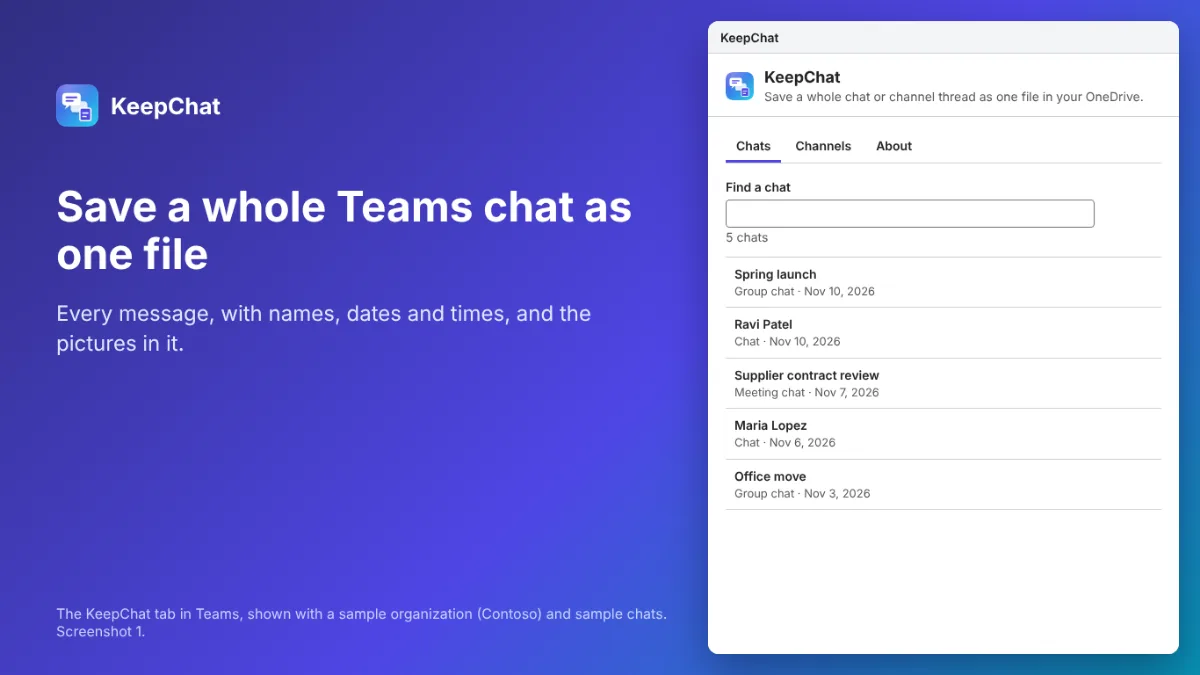
Teams has no button to save a whole conversation. KeepChat adds one: pick a chat or a channel thread, pick PDF, Word or HTML, and every message, with who sent it, when, and the pictures in it, goes into one file in your own OneDrive. Coming to the Teams Store.
KeepChat at a glance
- What it is
- Teams app for the Microsoft Marketplace
- For
- People
- Price
- Free, or from $9 a month
- Website
- getkeepchat.com
What KeepChat does
The whole conversation
Every message in order, with the name, the date and time, edits and deletions marked, replies quoted, reactions counted and files listed with links.
PDF, Word or HTML
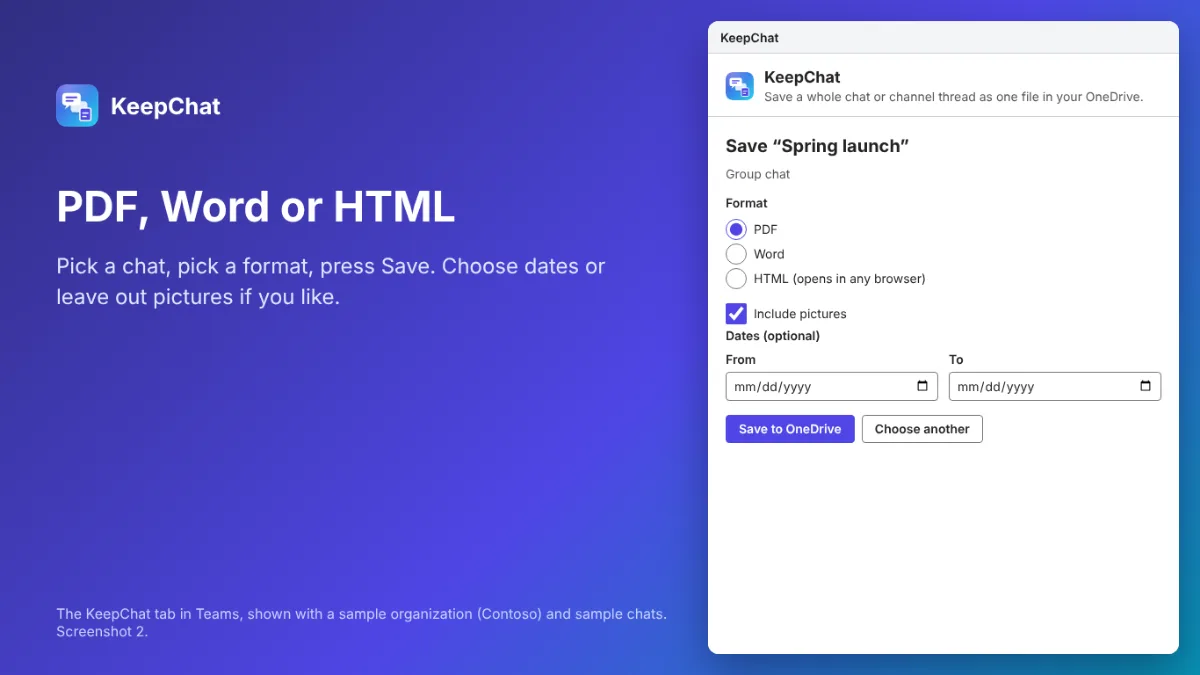
A tidy PDF, a Word document you can edit, or one HTML page that opens in any browser. Each has headings by day and alt text on pictures.
Pictures included
Pictures pasted into messages are in the file. Leave them out for a smaller file, or choose dates to save part of a long chat.
Stays in your Microsoft 365
KeepChat runs in your Teams window with your own sign-in and saves to your own OneDrive. Nothing from your chats is sent to us.
See KeepChat at work
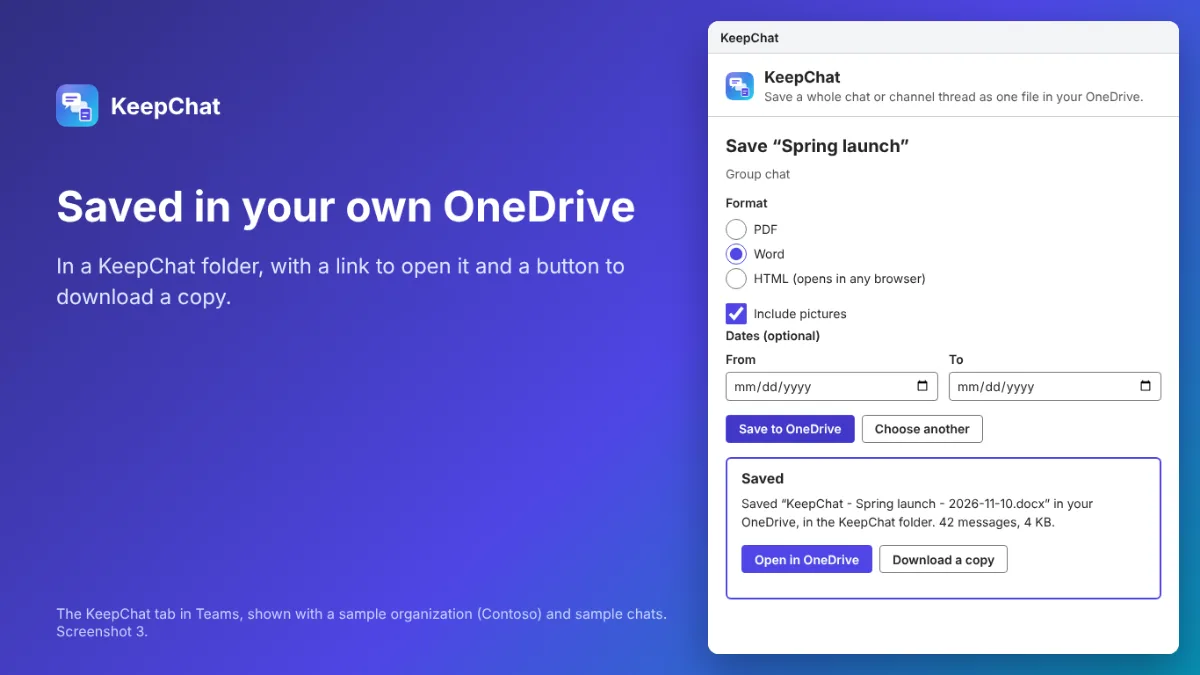
Real screenshots of KeepChat's tab, the page Teams shows, built and run with a sample organization (Contoso) and sample chats; Teams itself is not shown.
Who it’s for
- Anyone who needs a whole conversation as one document: a handover, a record of what was agreed, a project archive
- Teams that keep customer, supplier or HR conversations in Teams chats
- IT admins who want to give everyone a simple, approved way to keep a copy of a chat
How it works
- Your organization adds KeepChat from the Teams Store; an admin approves it once for everyone.
- Open KeepChat in Teams and pick a chat, or a team, channel and thread.
- Pick PDF, Word or HTML and press Save to OneDrive.
- Open the file from the KeepChat folder in your OneDrive, or download a copy.
KeepChat pricing
Free
$0
Pro
$9 a month
Pro for up to 500 people
$49 a month
Free: the latest 100 messages of any chat or thread, in every format. KeepChat Pro, one plan for the whole organization, saves whole conversations: $9 a month or $90 a year for up to 50 people, $49 a month or $490 a year for up to 500, paid on Stripe’s checkout. Refunds within 14 days.
Questions about KeepChat
Can KeepChat read other people’s chats?
No. It reads only chats and channels you are already in, with your own Microsoft sign-in, and only the one you choose to save.
Why does an admin have to approve it?
Microsoft asks for an admin’s approval before any app can read Teams chats in most organizations. One approval covers everyone, in the Teams admin center or with the link KeepChat shows.
Where do the files go?
To a folder called KeepChat in your own OneDrive. KeepChat keeps no copy, and nothing from a chat reaches Tenhatch.
Related Tenhatch tools
SendLull
Holds every email you send from new Outlook or Outlook on the web for 1 to 10 minutes, in Drafts, so a mistake can still be fixed. Admins can turn it on for everyone.
EmailSifter
Checks up to 100 email addresses at a time: badly written, no such domain, no mail server, throwaway addresses and typos like gmial.com, each with a plain reason.
PeriodGuard
Keeps every change to your accounting records, who made it and each value before and after, and emails you and your accountant when a month you closed is changed.
Need something like KeepChat made for your business? Tell us what you need.
Not affiliated with, endorsed by or sponsored by Microsoft. Microsoft, Teams and OneDrive are trademarks of the Microsoft group of companies.